It’s 106 miles to Chicago, we got a full tank of gas, half a pack of cigarettes, it’s dark… and we’re wearing sunglasses. Hit it.
One of the most quotable scenes in movie history. Two guys in a car. Simple, right? I wanted to see if Google’s Veo AI video generator could pull it off — with a twist. Instead of Dan Aykroyd and John Belushi, I wanted Jake and Elwood reimagined as baby-faced men. Adults in black suits and fedoras, but with round chubby cheeks, button noses, and big innocent eyes. The uncanny, slightly cursed energy of a toddler who just closed a deal.
Here’s what happened when I put Veo through its paces with an 8-second time limit.
The Constraints: 8 Seconds, No Do-Overs (Sort Of)
Google’s free Veo trial caps you at 8-second clips. That’s tight. The original Blues Brothers monologue clocks in around 12 seconds with “Hit it” at the end, so the prompt had to be economical. Every word in the scene description matters when you’re working within that window.
I drafted a detailed prompt with Claude’s help: interior of a beat-up 1974 Dodge Monaco at night, shot from the back seat, two men in black suits and fedoras with distinctly baby-like facial features, warm amber dashboard lighting, grainy 1980s 35mm film look. Elwood delivers the line, Jake says “Hit it,” engine revs. Tight, cinematic, and hopefully hilarious.
Take One: Veo Gets Creative With Physics
The first generation came back and… well, Veo nailed a lot of things. The car interior looks fantastic — vintage bench seat, period-correct dashboard, a grimy windshield with city lights bleeding through. The warm amber lighting is gorgeous. It genuinely looks like it could be a frame from a late-70s film.
The baby-face concept? Partially achieved. Elwood (the driver) came out with legitimately cherubic features — puffy round cheeks, smooth skin, that thousand-yard infant stare. Jake drifted more toward “exhausted middle manager” than “baby,” leaning into a slightly puppetish, marionette-like quality that wasn’t what I asked for but was weirdly compelling.
But here’s where it got interesting.
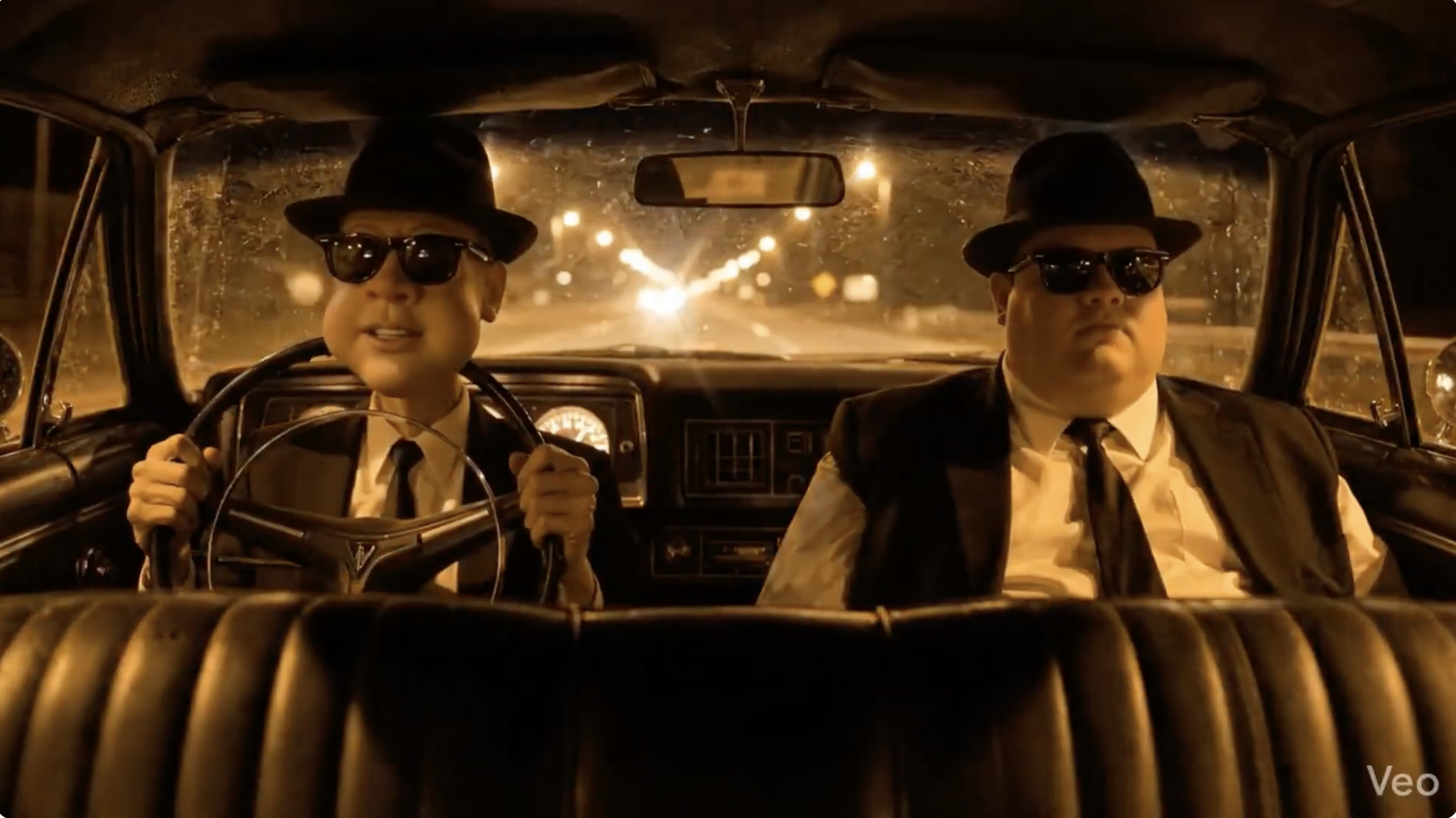
Both characters are facing the rear of the car. Not forward, toward the windshield. Backward, toward the back seat — toward the camera. And Elwood? His head is through the steering wheel. Not behind it. Not gripping it normally. His neck is threaded through the center of the wheel like he’s wearing it as a very uncomfortable necklace, with his hands reaching backward to grip it from the wrong side.
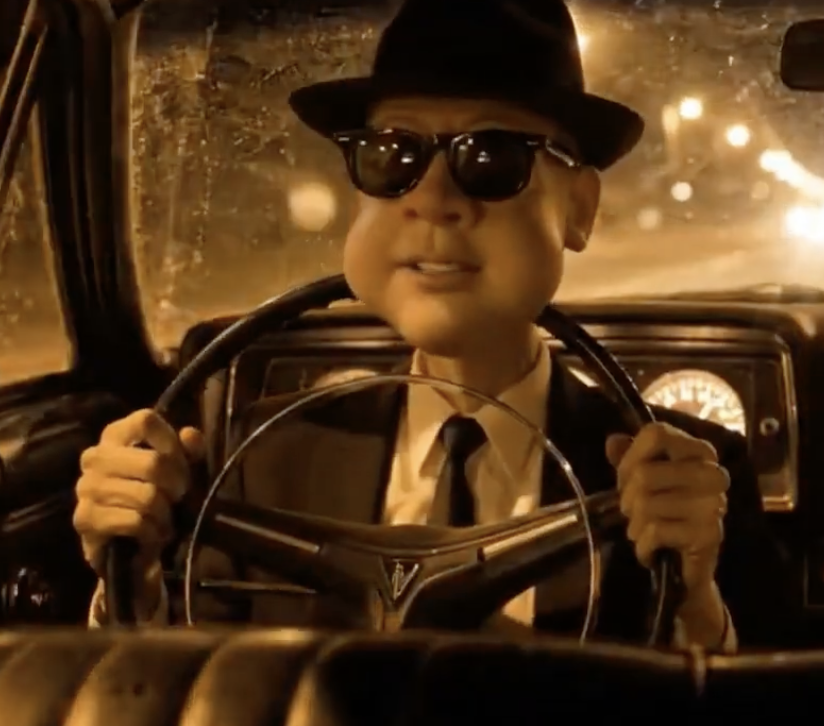
It’s the kind of result that makes you laugh, then think, then laugh again.
Why Did Veo Do That?
This is actually a fascinating window into how these models interpret spatial language. My prompt said:
“Shot from the back seat looking forward between two men in the front seats”
And then described them in “profile/three-quarter view.”
Veo seems to have resolved two competing spatial instructions — camera in the back seat, subjects facing the camera — by rotating the actors instead of the camera. It satisfied both constraints simultaneously by breaking the laws of physics. The camera is in the back. The men face the camera. Therefore the men face backward. Prompt followed. Mission accomplished. Steering wheel be damned.
It’s a very literal, very AI way to solve a spatial reasoning problem. And honestly, it’s a great reminder that these models don’t “understand” physical space — they’re pattern-matching language to visual output and sometimes the seams show in spectacular ways.
Take Two: Dashboard Cam Fix
For the second attempt, I reworked the camera language entirely. Instead of describing a back-seat perspective, I went with:
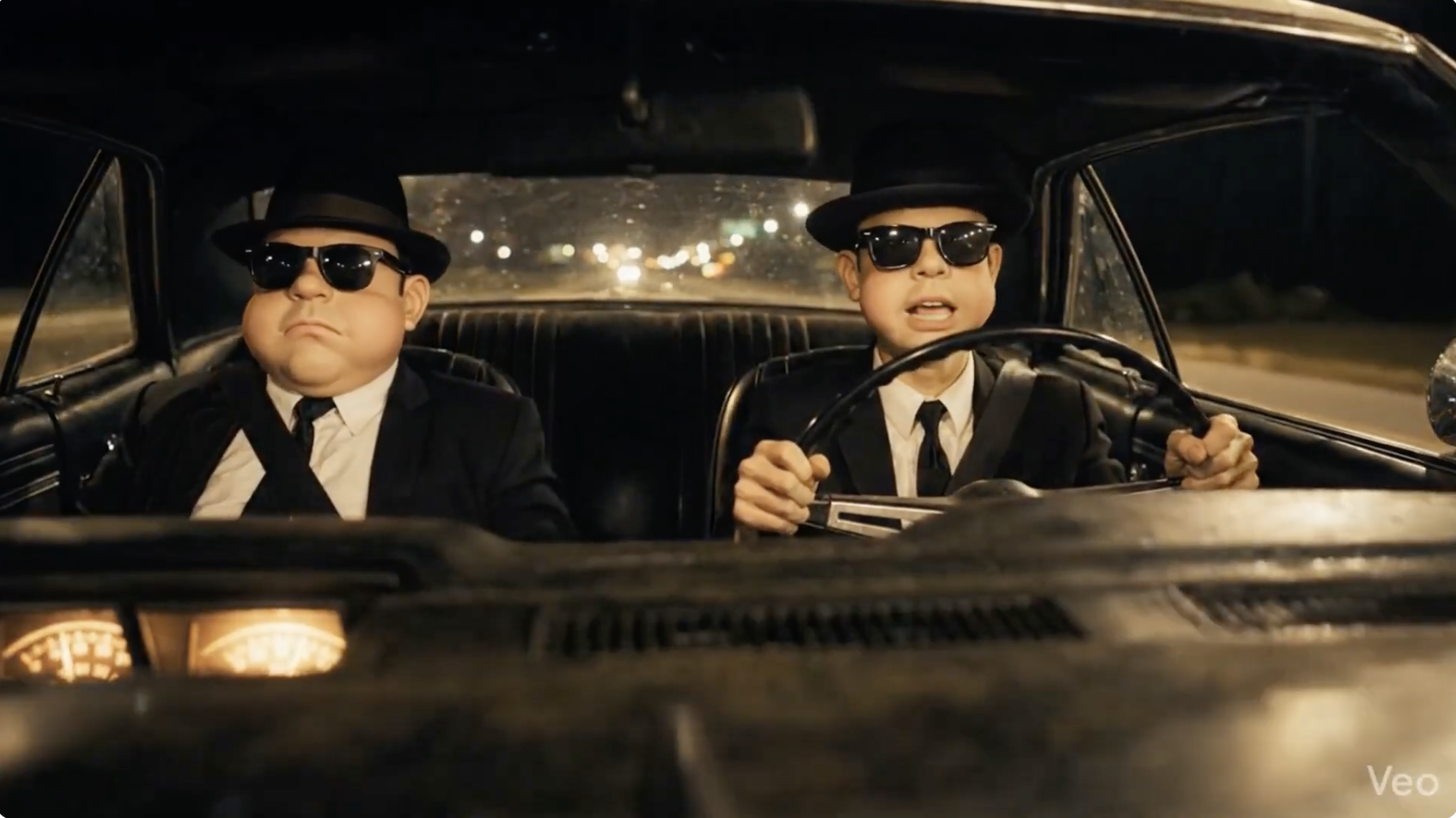
“Camera mounted on the dashboard facing the two men directly, showing both from the chest up. Both men face forward toward the windshield / toward the camera, seated normally in the front seats. Elwood’s hands are on the steering wheel in front of him in the natural driving position.”
The key insight: put the camera where the characters are already looking. In the original Blues Brothers scene, the classic shot is a dashboard-mount. By describing it that way, Veo doesn’t have to resolve any spatial contradictions. Characters face forward. Camera faces backward. Everyone’s oriented correctly. No one’s head goes through a steering wheel.
Takeaways for Prompting Video AI
If you’re experimenting with Veo (or any video generation model), here are a few things I learned from this exercise:
Spatial language is treacherous. “Shot from behind” and “facing the camera” can create contradictions the model resolves in unexpected ways. Describe the camera position in terms that naturally align with where subjects are already looking.
Be explicit about what “normal” looks like. You wouldn’t think you’d need to specify “hands on the steering wheel in the natural driving position,” but here we are. If there’s a default physical arrangement you’re expecting, spell it out.
The 8-second free tier is tighter than you think. The full Blues Brothers quote plus “Hit it” is right at the edge. If your scene has dialogue, time it out loud before you commit to the prompt. You may need to trim.
Character consistency is still a gamble. I asked for two baby-faced men and got one baby-faced man and one tired puppet. Describing each character’s face independently and in detail helps, but don’t expect identical stylistic treatment across multiple subjects.
Save the weird outputs. The backwards-facing, steering-wheel-as-necklace version is honestly more memorable than a “correct” generation would have been. AI’s mistakes are often more interesting than its successes.
Watch Both Takes
I put both Veo generations together in a single video so you can see the comparison side by side. The audio actually came through surprisingly well for both — Elwood delivers the line with a flat deadpan, and the timing fits within the 8-second window.
Blues Brothers Baby Face — Veo AI Test
Have you been experimenting with Veo or other AI video tools? I’d love to see what you’re making — drop a link in the comments.